10 POS System Features Every Restaurant Owner Should Look For in 2026
Running a restaurant today means managing constant pressure from every direction. Online orders, digital payments, and customer expectations are all happening at once, and a small delay can throw the entire service off track. This is why understanding the right POS system features is no longer optional. A smart POS does much more than process bills. It connects your kitchen, staff, and customers to keep everything running smoothly.
As we move toward 2026, technology is transforming how restaurants operate. The latest restaurant POS features are designed to predict problems, improve speed, and help owners make smarter business decisions. In this blog, we will explore the most essential POS system features for restaurants that are shaping the future of dining and helping businesses turn daily challenges into consistent growth.
Why Do Restaurant POS Features Matter in 2026?
The restaurant industry is propelled by technology in 2026. Modern POS systems now provide features that go far beyond simple billing. AI is used to predict orders, cloud connectivity enables remote management, and automation ensures efficient kitchen operations. With the growth of restaurants across locations and rising customer expectations, choosing the right POS system features is essential for operational efficiency and regulatory compliance.
Analyzing trustworthy restaurant POS reviews helps owners look beyond promotions and uncover what truly works. The leading systems handle peak times effortlessly, integrate with delivery apps, and protect data with advanced security protocols. A recent report revealed that more than 50% of restaurants are upgrading their POS for greater speed and accuracy. The result is faster service, lower costs, and better decisions influenced by the right technology.
Pro Tip- When checking reviews, focus on real user feedback about reliability and support. The right POS is not just feature-rich; it is the one your team can actually trust during peak hours.

Online Orders Made Easy
Plum POS Ensures Seamless Processing
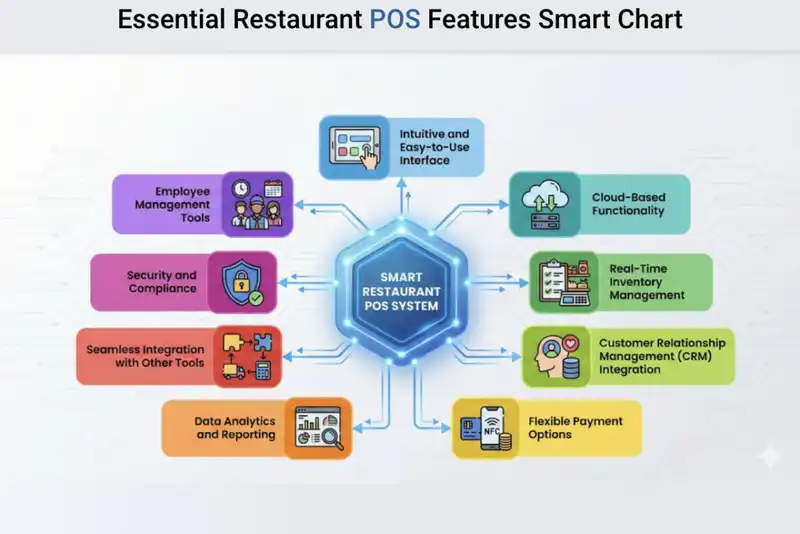
Top 10 POS System Features Every Restaurant Needs in 2026
1. Intuitive and Easy-to-Use Interface
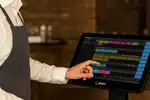
A modern restaurant POS system should be easy to navigate, even for new staff on their first day. With POS system features like a simple, visually clear interface, you minimize errors during rush hours and speed up service. The fewer clicks it takes to complete an order, the smoother your operations will run. In 2026, restaurant POS features will focus on systems that reduce training time, improve workflow efficiency, and boost staff confidence. By selecting the right POS system, you ensure your team operates at peak performance with minimal stress.
Pros-
- Streamlined employee onboarding- A user-friendly platform minimizes the training duration for new hires. Employees can learn to take orders, divide bills, and handle payments in a matter of hours rather than days. This is particularly beneficial in eateries with significant employee turnover.
- Quicker order handling- When buttons are clearly marked and menus are well-structured, staff can input orders rapidly. At peak times, saving just a few seconds per order significantly impacts total service duration.
- Reduced operational mistakes- Straightforward systems lessen misunderstandings. Employees are less prone to hit the incorrect button or overlook modifiers such as no onions or extra cheese, enhancing order precision.
Cons-- May offer limited customization- Certain basic systems might not permit extensive changes to menus or workflows. This may pose a constraint for restaurants that have intricate menu arrangements.
- Certain systems trade off depth for ease of use- To simplify the interface, some providers eliminate advanced features. As your company expands, you might require functionalities that basic systems do not provide.
2. Cloud-Based Functionality
Cloud-based POS systems have become essential for restaurant owners who want flexibility and real-time access. With this feature, your sales, inventory, and reports are always available online, even when you are not physically at the restaurant. It ensures automatic updates, backups, and security. For multi-location restaurants, this feature keeps everything in sync without manual data entry.
Pros-
- Access business data anytime, anywhere- You can view daily sales, assess performance, or manage inventory from your smartphone or computer. This provides owners greater control, even while traveling or overseeing several locations.
- Automatic software updates- Cloud systems install updates automatically without requiring manual intervention. This implies you consistently access the newest features and enhancements for security.
- Secure data backups- Your information is securely stored online. Even if the hardware gets compromised, your business data stays secure and retrievable.
Cons-- Requires strong internet connectivity- A weak or unstable internet connection can lead to reduced system performance. While numerous systems provide offline options, complete functionality typically relies on internet connectivity.
- May include subscription costs- Cloud POS systems typically impose monthly or annual charges. Eventually, these ongoing expenses must be included in your budget.

From Click to Kitchen
Handle All Your Online Orders with Plum POS
3. 24/7 Support and System Reliability
A POS system is essential infrastructure for a restaurant. When it malfunctions, billing halts, orders diminish, and revenue is instantly jeopardized. By 2026, 24/7 technical assistance and system dependability are essential features of POS systems. Restaurants function outside of standard business hours, covering evenings, weekends, and holidays. When problems occur during peak service, promptly recall that downtime directly affects guest experience, employee efficiency, and revenue.
The ideal POS partner offers 24/7 assistance via live chat, phone, and quick-response problem-solving. This guarantees that technical issues are addressed in minutes instead of hours, aiding restaurants in delivering consistent service and safeguarding income during peak times.
Pros-
- Reduces Revenue Loss- Immediate assistance avoids prolonged downtime during busy service times.
- Safeguards Guest Experience- Quicker problem resolution results in reduced hold-ups during checkout and order handling.
- Enhances Operational Assurance- Employees and supervisors can work with confidence, knowing assistance is consistently accessible.
- Reduce Pressure during Peak hours- Instant access to assistance minimizes stress on frontline teams when systems face challenges.
Cons-- Premium support tiers might have higher costs- 24/7 support plans could raise monthly service charges.
- Support quality differs among providers- Not every vendor delivers identical response times or technical expertise, highlighting the importance of evaluating vendors.
- Reliance on vendor responsiveness- When support teams are overwhelmed, resolution times can still be affected during major outages.
4. Menu Customization and Modifiers
Menu modifications and customizations enable restaurants to adjust menu items based on customer preferences. A POS system that accommodates modifiers allows employees to effortlessly note special requests like cooking preferences, ingredient alterations, portion sizes, or additional items. This guarantees that customers receive meals made precisely to their preferences, enhancing their overall dining experience and contentment.
Menu customization allows restaurant owners and managers to have flexibility in controlling offerings and pricing. They can swiftly change menu items, launch seasonal dishes, modify prices, or include optional enhancements. When combined with kitchen display systems (KDS), these tailored orders are transmitted directly to the kitchen with detailed instructions, assisting staff in accurately preparing dishes and minimizing order mistakes.
Pros-
- Improved Customer Experience- Clients can customize their meals according to taste preferences, allergies, or dietary needs.
- Increased Average Order Value- Add-ons and premium enhancements like additional toppings or upgraded sides can boost revenue per order.
- Enhanced Order Precision- Modifiers guarantee that specific requests are accurately noted and conveyed to the kitchen.
- Adaptive Menu Administration- Restaurant managers can easily modify menu selections, prices, and seasonal offerings without significant system alterations.
Cons-- Slower Ordering Process- Too many customization options can slow down order taking, especially during busy service hours.
- Increased Kitchen Complexity- Highly customized orders can disrupt kitchen workflows and make preparation more complicated.
- Staff Training Requirements- Employees need proper training to correctly use modifiers in the POS system and avoid mistakes.
5. Flexible Payment Options
Customers want options when paying for their meals. From credit cards to digital wallets and QR codes, modern restaurant POS features must handle every mode seamlessly. Some systems even support split billing or group payments, which is ideal for restaurants. Flexibility at checkout improves the dining experience and ensures faster table turnover.
Pros-
- Seamless payment process- Customers can utilize their chosen method for payment. This enhances satisfaction and minimizes checkout difficulties.
- Quicker transactions- Contactless and digital payments enhance the billing process, particularly during busy times.
- Accommodates various payment options- Dividing bills and group payments is simplified, making it beneficial for restaurants and large gatherings.
Cons-- Transaction costs for certain platforms- Digital wallets and card companies might impose processing fees that influence profit margins.
- Intermittent delays caused by network problems- Digital transactions rely on network access, which can occasionally hinder the speed of payments.
6. Data Analytics and Reporting
Smart POS system features currently provide data-driven dashboards that showcase what is effective and what is not. You can monitor top-selling items, employee performance, and sales trends to improve decision-making. This insight aids managers in planning staffing, pricing, and promotions with greater effectiveness. By 2026, restaurants that leverage analytics will possess a distinct competitive advantage.
Pros-
- Immediate insights for expansion- You can swiftly identify which meals are the best sellers and which ones fail to perform effectively.
- Simplified decision-making- Information aids in making informed choices regarding pricing, staffing, and promotions.
- Enhances profit monitoring- You can easily monitor income, expenses, and profit margins.
Cons-- Complicated data might require analytical skills- Certain reports might seem daunting without a fundamental analytical understanding.
- Certain reports need to be tailored- Setting up or configuring advanced reports may be necessary
Your POS must effortlessly integrate with accounting software, delivery applications, and marketing platforms. These integrations remove the need for manual data transfer and enhance operational efficiency. Syncing with services such as DoorDash, QuickBooks, or loyalty programs is often an underappreciated feature of POS systems for restaurants, helping to save time and minimize human error.
Pros-
- Optimizes daily functions- With your POS linked to accounting software, delivery applications, and payroll systems, all information updates instantly.
- Decreases manual tasks and human mistakes- In the absence of integration, employees might have to input identical information into various systems. This raises the likelihood of errors.
- Boosts business automation- Automation increases pace and effectiveness. For example, when an order is made online, it can instantly show up in your POS and kitchen system.
- Enhances reporting precision- Unified systems generate consolidated reports. You can view comprehensive performance data for in-store dining, online delivery, and takeaway without having to combine reports by hand.
Cons-- Certain integrations incur extra charges- Numerous POS providers impose additional costs for third-party integrations. Enhanced integrations, like accounting programs or sophisticated marketing tools, could elevate your total subscription expenses.
- May need technical assistance for configuration- Configuring integrations can occasionally be complicated. Technical support might be necessary during installation to guarantee proper synchronization.
- Compatibility issues- Not every tool functions seamlessly with every other tool. Certain legacy systems or specialized software might not connect seamlessly, leading to operational difficulties.
8. Security and Compliance
Restaurants handle sensitive payment and customer data, making security non-negotiable. The latest POS systems use encryption, secure logins, and role-based access to prevent fraud or data theft. Compliance with data protection regulations ensures customer trust and avoids penalties. Security will remain one of the top POS system features for restaurants in 2026.
Pros-
- Builds customer trust- When customers know their payment information is secure, they feel more confident dining at your restaurant. Trust directly influences repeat business and brand reputation.
- Protects financial data- Encryption ensures that payment information is unreadable to unauthorized users. Secure login systems prevent internal misuse of sensitive data.
- Reduces fraud risk-- Role-based access allows managers to control who can access certain information. For example, only authorized staff can issue refunds or view financial reports. This reduces internal theft and fraud.
- Helps meet legal requirements- Compliance with data protection laws helps avoid penalties and legal trouble. A compliant POS system protects your restaurant from regulatory risks.
Cons-- Requires regular monitoring and updates- Security is not a one-time setup. Systems need continuous updates and monitoring to stay protected against new threats. This requires attention and sometimes additional IT support.
- Occasional update downtime- Security patches and updates may require system restarts or temporary downtime, which can interrupt operations if not scheduled properly.
9. Mobile POS Capability
A mobile POS system allows staff to take orders and payments directly at the table. It cuts down waiting time, improves order accuracy, and creates a smoother dining flow. This flexibility is especially valuable for large or outdoor setups. By 2026, most restaurants will rely on mobile POS for faster and more personalized service.
Pros-
- Faster table service- Orders are sent directly to the kitchen as soon as they are entered. This removes the need for servers to walk back and forth to a fixed terminal, saving valuable time during busy hours.
- Reduces order errors- When orders are entered immediately at the table, there is less chance of forgetting details or miscommunicating special requests. This improves accuracy and customer satisfaction.
- Enhances customer experience- Customers appreciate faster service and quicker payments. Mobile POS allows guests to pay at the table without waiting for a bill at the counter.
- Improves table turnover- Quicker ordering and billing mean tables free up faster, allowing you to serve more customers during peak hours.
Cons-- Depends on Wi-Fi stability- Mobile POS systems rely heavily on strong and stable internet connectivity. Weak signals may slow down order processing.
- Devices need regular charging and maintenance- Tablets and handheld devices must be charged, updated, and maintained. Dead batteries during service can cause delays.
- Initial hardware investment- Purchasing multiple mobile devices increases upfront costs compared to traditional fixed terminals.
A restaurant POS with employee management features can track attendance, manage shifts, and evaluate performance automatically. It helps managers identify top performers and optimize schedules. This not only saves time but also keeps payroll accurate and transparent. Smart POS systems are now becoming digital HR assistants for restaurants.
Pros-
- Simplifies shift scheduling- Managers can create schedules directly in the system and adjust them easily when needed. This reduces confusion and improves communication among staff.
- Improves team accountability- Attendance tracking and performance reports help identify punctual employees and those who may need improvement. Clear data creates transparency.
- Saves administrative time- Instead of manually tracking hours and calculating payroll, the system records employee clock-ins and clock-outs automatically. This reduces paperwork and saves time.
- Helps control labor costs- By analyzing staff performance and peak-hour trends, managers can optimize staffing levels and avoid over-scheduling.
Cons-- Smaller teams may not need advanced tools- Very small restaurants with few employees may find these features unnecessary and underutilized.
- Requires manager training- Managers must understand how to interpret employee performance reports and scheduling tools properly.
- Privacy concerns- Tracking employee performance and attendance must be handled responsibly to maintain trust and transparency.
What to Look for When Selecting a Restaurant POS System?
Once you understand the key POS system features for restaurants, the next step is finding a system that aligns with your specific needs. The right POS can streamline billing, speed up service, and reduce operational friction.
- Know your needs- A small cafe and a large restaurant chain require different setups. Choose restaurant POS features that match your size and operational flow.
- Pick your setup- Cloud-based POS systems offer flexibility, remote access, and automatic updates, while on-site systems provide more control and reliability.
- Check reliability- Choose vendors with strong customer support, easy integration options, and scalability to ensure your system grows with your restaurant.
- Review total cost- Consider software, hardware, maintenance, and processing fees to understand the full investment.
Solutions like Altametrics offer POS system features for restaurants that are both flexible and scalable, ensuring your system evolves as your business does.
Common Mistakes to Avoid When Choosing a Restaurant POS System
When selecting a POS system, many restaurant owners make the mistake of focusing solely on price, overlooking the long-term value of key POS system features for restaurants. Failing to consider future scalability or choosing a system that lacks reliable customer support can lead to frustration and costly downtime. Another common pitfall is ignoring integration capabilities. A POS system that doesn't work well with your existing tools can slow down operations. Lastly, always check the total cost, including software, hardware, and transaction fees, to avoid unexpected expenses. A little extra research upfront can save you significant headaches down the line.
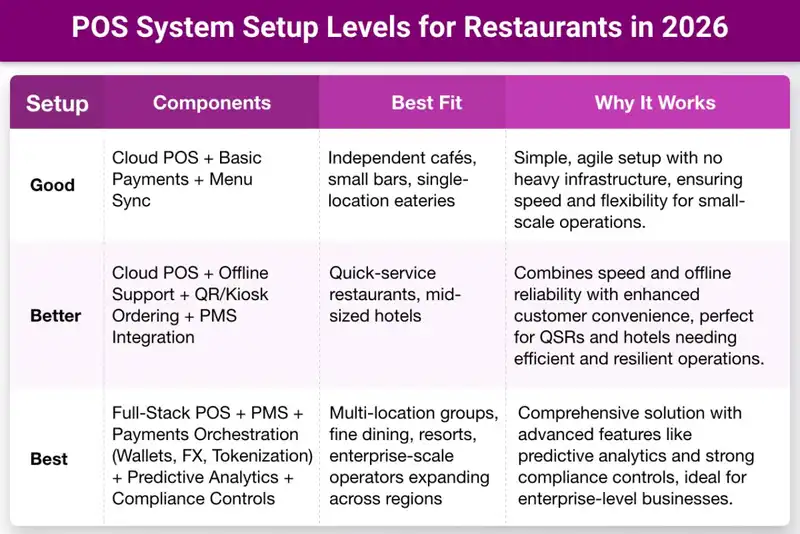
POS System Setup Levels for Restaurants in 2026
Choosing the right POS system depends on your restaurant's size, operations, and growth goals. Here's a breakdown of setup levels tailored to different types of restaurants, from small cafes to enterprise-scale operations.
Selecting the appropriate setup ensures smooth operations, improved customer experience, and scalable growth. Whether you're running a single-location eatery or a multi-location group, there's a POS solution designed to fit your business needs.
Conclusion
Choosing the right POS system in 2026 is not about having the most features. It is about choosing a system that delivers measurable ROI.
The right POS should reduce food and labor waste, improve order accuracy, increase operational visibility, protect revenue, and support long-term growth through innovation and strong support.
Brands like Plum POS are designed to improve ROI by helping operators control costs, reduce errors, and make better, data-driven decisions. When a POS system strengthens margins and improves service efficiency, it stops being an expense and becomes a growth engine.

Accept, Process, and Profit with Ease!
Streamline Your Online Orders with Plum POS