This is why choosing the right QSR POS system has become one of the most important technology decisions for modern restaurant operators.
In this environment, a traditional Point of Sale (POS) system that simply records transactions is no longer enough.
Modern QSR operators need a system that actively moves orders through the business faster, with fewer errors and less labor friction. This is why the POS must evolve into what can best be described as a Point of Throughput.
This guide explains how high-performing QSR brands design their technology ecosystem around speed, accuracy, and margin protection. It looks at how self-service ordering affects guest behavior, how kitchens must function more like logistics hubs, and how predictive data helps operators make smarter decisions in real time.
The New ROI - Measuring Velocity, Not Just Sales
In conventional full-service dining establishments, performance is frequently assessed through PPA (Price Per Average) or average check amounts. These metrics are relevant in a setting where table turnover is sluggish, and customer experience relies on service speed.
In the QSR industry, the key metric is Throughput Per Minute. This quantifies the number of completed orders a restaurant can handle within a set timeframe. For QSR operators, efficiency directly impacts revenue potential.
A contemporary QSR operator is no longer merely a food entrepreneur. They are efficiently overseeing a logistics operation, where minor delays accumulate into significant revenue losses.

Accept, Process, and Profit with Ease!
Streamline Your Online Orders with Plum POS
For example -
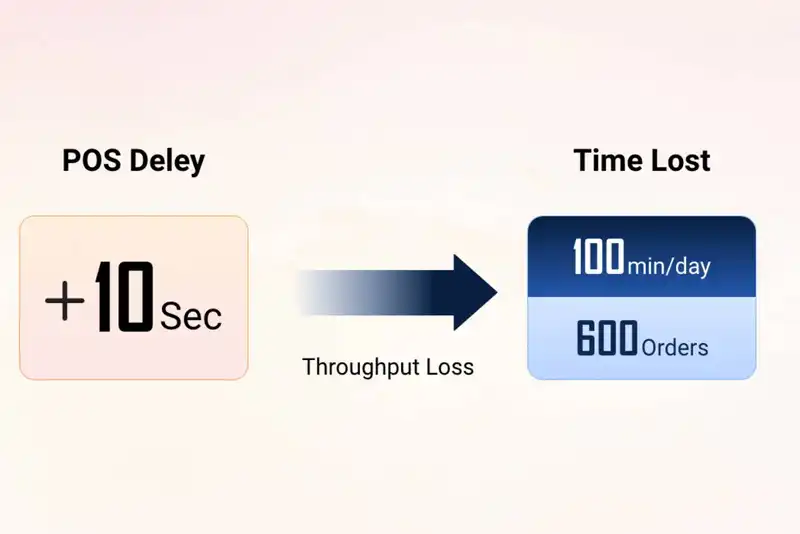
- If your POS system takes 10 extra seconds to process each order.
- Your store processes 600 orders per day.
Result - You lose 100 minutes of selling time every single day
When this inefficiency is multiplied across dozens or hundreds of locations, the cost is no longer theoretical. It becomes millions in lost revenue opportunity over the course of a year.
A modern QSR technology strategy shifts the focus away from simply recording sales and toward identifying and removing bottlenecks at every step of the order lifecycle. The goal is not just accuracy, but continuous flow.
Psychology of the Kiosk - Why Self-Service Drives 20% Higher Checks
Self-service kiosks frequently produce larger average checks, commonly elevating order values by as much as 20%. The justification goes beyond mere convenience. It is the study of the mind. When guests order at a kiosk, the pressure of standing at a counter disappears. There is no queue behind them and no cashier prepared to assist the next customer. Guests take longer to examine the menu, think about upgrades, and include extras without feeling hurried or judged.
Kiosks enhance the effectiveness of upselling. The screen displays visual cues, combo enhancements, and high-margin products systematically, rather than depending on staff to verbally recommend add-ons. Observing an enhanced meal, sweet treat, or deluxe topping boosts perceived worth and prompts spontaneous choices. As the system consistently remembers to recommend add-ons, upselling becomes reliable and informed by data.
Personalization also plays a crucial part. When guests build their orders step-by-step, they experience heightened control and a deeper emotional connection to their choices. This feeling of ownership lowers price sensitivity and heightens willingness to spend. Directed ordering processes also lessen decision fatigue, facilitating guests' agreement to extra items

From Click to Kitchen
Handle All Your Online Orders with Plum POS
1. The "Zero-Pressure" Upsell
Guests frequently feel hurried when placing their orders at a counter. There is societal pressure to proceed rapidly to avoid delaying the queue. This results in what can be termed as protective ordering, where visitors consistently place the same order during each visit and forgo additional items.
A kiosk eliminates that stress. Visitors can peruse at their leisure, examine options, and think about enhancements without experiencing pressure or scrutiny.
As a Result -
Add-ons are displayed consistently. Time-sensitive items gain increased attention. Size enhancements and combinations are selected more frequently.
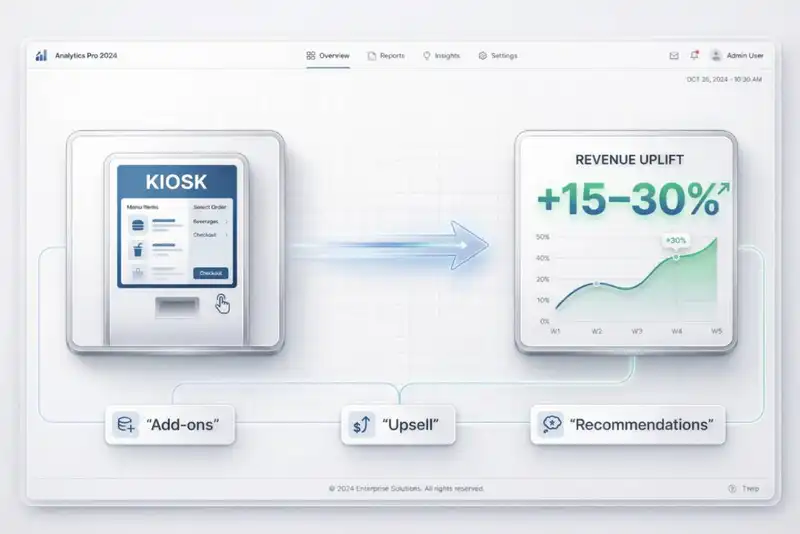
Data from the industry consistently indicates that orders made at kiosks are typically 15% to 30% greater than those placed at the counter. The kiosk always remembers to recommend additional items and never misses an upsell because of a busy cashier.
2. Order Accuracy and the Visual Contract.
Another major advantage of kiosks is order accuracy. Miscommunication at the counter is one of the largest causes of waste in QSR operations. Incorrect modifiers, misunderstood requests, and missed customizations often lead to remakes.
When guests build their order visually on a screen, they are effectively entering into a visual contract with the kitchen. They can see exactly what they selected, confirm it, and submit it themselves.
This dramatically reduces voids and refunds and then food waste from remakes. It also prevents guest dissatisfaction resulting from incorrect orders, long wait times due to remakes, and inconsistent service experiences.
For operators focused on margin protection, especially multi-unit brands, this improvement in accuracy has a direct financial impact.
The Omnichannel Drive-Thru - Architecting the 30-Second Window
For most modern QSR brands, the drive-thru is no longer just an additional sales channel. It is the primary revenue engine. In many locations, drive-thru transactions account for 60% to 70% of total daily sales. Because of this, even small improvements in drive-thru speed can create meaningful revenue gains across a multi-unit system.
However, the traditional speaker-box model was designed for a much simpler era. Guests would pull up, place a standard order, pay at the window, and receive food prepared in a predictable sequence. Today, the drive-thru must handle mobile pre-orders, curbside pickups, third-party delivery drivers, subscription redemptions, loyalty scans, and increasingly customized menu items. The operational complexity has increased dramatically, but many systems are still built around outdated workflows.
To sustain a 30-second window target in this environment, the drive-thru must be treated as a coordinated ecosystem rather than a single ordering point.
A. Geofencing and Order Pacing
Modern QSR systems do not wait for a guest to arrive at the menu board. With geofencing technology, the POS can detect when a mobile-order guest is approaching the location.
This enables smarter kitchen timing -
The system alerts the kitchen only when the guest is within a defined radius. Items like fries are started at the right moment, not too early. Food quality is preserved without slowing the line.
This balance between freshness and speed is critical for maintaining drive-thru performance at scale.
B. Line-Busting with Handheld Devices
During peak lunch hours, the physical length of the drive-thru lane becomes a hard limitation. Even with a fast kitchen, cars cannot move any quicker.
Line-busting solves this problem by extending the ordering process beyond the speaker. Staff equipped with rugged handheld devices can take orders from several cars back in the line.
This effectively creates a digital lane without construction. It not only reduces idle time at the menu board but also increases total orders processed per hour.
For high-volume locations, this can significantly increase throughput without expanding the footprint.
The Kitchen as a Logistics Hub - Beyond the Simple KDS
In numerous fast-food establishments, the Kitchen Display System (KDS) is regarded merely as a digital substitute for paper orders. Orders display on a screen rather than being printed on a slip, yet the workflow itself does not change. Although this might decrease paper accumulation, it fails to reveal the true functional benefits of kitchen technology.
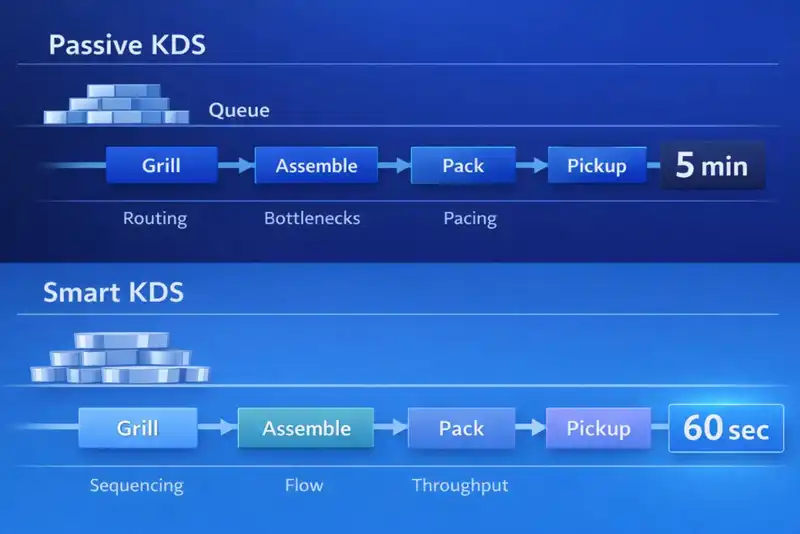
In high-traffic QSR settings, the kitchen serves as more than just a food prep area. It operates like a production line where timing, sequencing, and coordination decide if orders are finished in 60 seconds or 5 minutes. If the KDS simply shows orders without regulating their movement in the kitchen, it turns into a passive tool instead of a performance enhancer.
A contemporary KDS needs to function as a logistics manager. It must effectively coordinate order timing, allocate workload wisely, and synchronize preparation pace with front-of-house requirements. When executed properly, the kitchen transforms into a coordinated system instead of a responsive setting.
Intelligent Order Sequencing and Pacing
- Various menu items have varying preparation durations. A grilled dish might require several minutes, whereas a chilled item could be ready in seconds. If these items are sent to stations simultaneously, one will inevitably be held up.
- A sophisticated KDS comprehends prep durations and organizes tasks appropriately. It postpones notifications for quicker items to ensure all parts of an order are finished at the same time. This cuts down holding time and enhances overall speed.
This style of pacing guarantees that orders are organized effectively and dispatched with top-notch quality.
Dynamic Routing Across Channels- In omnichannel environments, orders arrive from kiosks, counter terminals, mobile apps, and third-party delivery platforms. Without intelligent routing, these orders can overwhelm a single make-line.
- A modern KDS dynamically routes orders to different stations based on the current workload. This prevents front-counter staff from being overloaded by digital orders and keeps production balanced across the kitchen.
This approach allows kitchens to scale volume without sacrificing consistency or speed.
Labor Optimization - Reducing Friction in a High-Turnover Environment
Quick-service restaurants function in a highly demanding labor market in the economy. Employee turnover rates are considerably elevated compared to many other sectors, indicating that managers are perpetually recruiting, training, and integrating new staff. In numerous places, a significant percentage of the workforce might possess less than half a year of experience at any moment.
Due to this reality, technology must not be developed solely for operational strength. It should also be created for simplicity in learning and simplicity in execution. A POS system that necessitates extended training sessions, complex workflows, or regular managerial interventions will hinder service and heighten frustration. Labor optimization in QSR involves more than simply decreasing hours; it focuses on minimizing friction in everyday operations.
Simplicity in UI and Efficiency in Training
- POS interfaces must be user-friendly enough for a new employee to use them confidently in just a few minutes. Complicated workflows or disorganized screens hinder service efficiency and raise training expenses.
- When systems are user-friendly, employees make fewer errors and need less oversight. This enhances service speed directly and lessens the manager's workload.
Gamification and Performance Visibility- Some operators use real-time Speed of Service dashboards that are visible to staff. These dashboards display metrics such as average order time or drive-thru performance.
- When employees can see performance in real time, it creates positive reinforcement. Teams often self-correct and push to improve without management pressure.
Data-Driven Scheduling- When POS data integrates with labor management tools, schedules can be built using predicted demand rather than guesswork. This allows managers to align staffing levels with expected sales.
- Predictive scheduling reduces overstaffing during slow periods and understaffing during unexpected rushes. The result is better labor efficiency without compromising guest experience.
Data-Led Inventory - Preventing Margin Erosion in Real Time
In QSR operations, profitability is often determined by very small percentages. A one- or two-point swing in food cost can separate a high-performing store from an underperforming one. Because margins are tight, even small inventory-inaccuracies can quietly erode profit over time.
Inventory problems rarely show up as dramatic failures. Instead, they appear gradually through over-ordering, unrecorded waste, incorrect portioning, and unnoticed shrinkage. Without real-time visibility, operators are forced to rely on periodic manual counts, which often reveal problems long after the financial damage has already occurred.
A modern POS system must do more than track sales. It must connect each transaction directly to ingredient-level inventory changes so operators can see what is happening in real time rather than at the end of the week.
Real-Time Ingredient Depletion
- Every sale should automatically update ingredient counts in the system. When an item is sold, all associated components should be deducted instantly.
- This creates accurate on-hand inventory data and prevents over-ordering or surprise shortages. Operators gain clearer visibility into true food costs.
Digital Waste Tracking and Analysis- Waste should be logged digitally at the POS or KDS at the moment it occurs. This removes reliance on manual logs that are often incomplete or inaccurate.
- When waste data is centralized, operators can identify patterns tied to specific shifts, menu items, or vendors. This level of insight allows targeted corrective action.
For multi-unit brands, this granularity can be the difference between average margins and strong profitability.
The Loyalty Loop - Gamifying the QSR Guest Experience
In the Quick Service Restaurant model, loyalty is not reliant on infrequent, substantial purchases. It relies on recurring visits. A visitor who comes three times a week holds significantly more value than one who visits monthly and spends a bit more. As a result, QSR loyalty approaches should emphasize frequency, habit development, and reducing friction rather than solely relying on promotional discounts.
Modern loyalty programs aim to do more than just reward buying behavior. The goal is to establish a behavioral loop that leads the guest to automatically associate your brand with hunger. An effective POS system is essential for maintaining this loop, as the loyalty logic needs to operate smoothly across kiosks, mobile applications, drive-thru lanes, and counter terminals.
Loyalty Programs Based on Subscriptions
- Subscription services, like drink clubs, motivate customers to come more frequently. To facilitate this, the POS should manage recurring billing and daily redemption processes smoothly.
- When subscriptions are simple to handle operationally, they create reliable income and boost visit frequency.
Personalized Re-Ordering Experiences- When a guest identifies themselves at a kiosk or app, the system should prioritize their usual order. This reduces ordering time and simplifies decision-making.
- Even saving a few seconds per transaction can significantly increase throughput during peak periods, allowing more orders to be processed without additional labor.
The Blueprint for Implementation - Minimizing Operational Downtime
System migrations are one of the most stressful events in a QSR operation. Unlike other industries, restaurants do not have the luxury of pausing business while technology is being replaced. Orders must continue to flow, drive-thrus must keep moving, and guests must not feel disruption. Even a single day of poor execution during a system switch can lead to lost revenue, frustrated staff, and damaged customer trust.
Because of this, POS implementation should never be treated as a technical upgrade alone. It must be handled as an operational transition strategy, where revenue protection and service continuity are the primary goals.
Below is a detailed framework that minimizes risk and protects performance during a POS migration.
Controlled Testing and Deployment
- Setting up a lab environment allows operators to test complex orders and workflows before going live. This reduces surprises during deployment.
- Shadow launches, where new systems run alongside old ones, allow staff to practice without affecting live service. This builds confidence before the full transition.
Cloud-Native Reliability- Offline mode is critical. If connectivity fails, operations must continue uninterrupted. Transactions should be stored locally and sync automatically when the connection is restored.
This level of preparation protects revenue and ensures continuity during critical transitions.
Conclusion - The Future of Autonomous Fast-Casual
The "Quick Service" restaurant of 2030 will likely be a hybrid of human hospitality and robotic precision. However, the foundation of that future is being laid today with the enterprise POS.
For the multi-unit operator, the goal is simple- Remove every possible barrier between the guest's hunger and the finished meal. When you treat your technology as a "Velocity Engine" rather than a "Software Expense," you unlock the true scaling potential of your brand.
Platforms like PlumPOS are designed specifically for fast-moving QSR environments, combining kiosk ordering, kitchen display systems, and real-time analytics in one unified platform.
By connecting every part of the operation, from order entry to kitchen production and reporting, operators can reduce friction, increase throughput, and protect margins as they scale.

Online Orders Made Easy
Plum POS Ensures Seamless Processing