Every day should be an experience for you if your business has grown to several locations. Keeping track of inventory, organizing menus, monitoring sales from the previous day, and managing several teams at all your restaurant's locations are the first tasks of the day.
However, do you find yourself becoming increasingly irritated with the never-ending workload, fixing problems, and checking every location report while maintaining customer satisfaction? Owners of restaurants with multiple locations frequently deal with these developing issues.
To tackle those issues and improve day-to-day decision-making, many owners use POS systems. This helps simplify operations and obtain real-time information through advanced POS Management Features.
A multi-location POS system is an efficient way to manage several sites using centralized POS Management Features. This blog will help you learn about multi-location POS systems, how they differ from conventional POS systems, and which characteristics to consider before investing.

Accept, Process, and Profit with Ease!
Streamline Your Online Orders with Plum POS
Understanding Multi-Location POS Systems
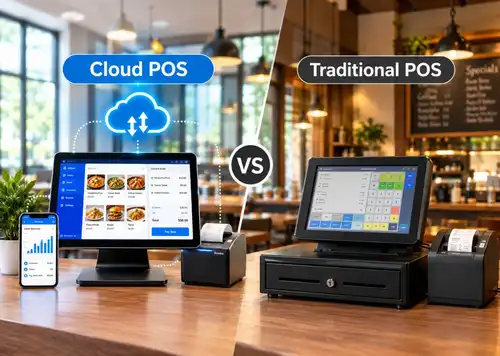
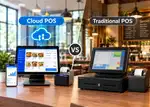
Conventional POS systems are often built to handle activities in a single location or utilize an on-premises server for several sites. In this scenario, conventional POS would only enable you to monitor inventory updates, sales, and customer information while you are at a particular restaurant location.
As a result, your restaurants with several locations operate in silos, as distinct entities with lower operational efficiency and limited access to modern POS Management Features. Furthermore, installing separate servers for each site may be required by standard POS systems, which might seriously hinder your potential to grow into a chain of restaurants.
By adopting a better approach, you may consolidate operations across several restaurant locations using a multi-location POS system with robust POS Management Features. Important procedures like employee scheduling, sales tracking, inventory management, and customer data management are all streamlined by it.
5 Essential Characteristics of a Multi-location POS System
Although a multi-location firm has a lot of promises, as we previously saw, managing these activities presents various obstacles. Among the challenges these companies confront are maintaining consistent inventory management, synchronizing sales data from all sites, and guaranteeing a consistent client experience across each site.
Some of these issues can be resolved with the use of a multi-location POS system powered by advanced POS Management Features. However, it needs to have some key characteristics to be effective.

From Click to Kitchen
Handle All Your Online Orders with Plum POS
1. Centralized Control Across All Restaurant Locations
Operating multiple restaurant locations can be like running a separate entity. Each outlet has its own sales processing, staffing problems, and daily operational problems. Without a connected system, restaurant operators must rely on calls, text messages, and delayed updates, making it more difficult to respond quickly or with confidence.
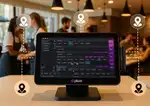
Implementing a multi-location POS system connects all of your restaurant locations to a single interface. You will now have all sales activity, inventory movement, employee activity, and performance across all of the restaurant's locations from a single dashboard, providing visibility into the complete operation of your entire restaurant chain at all times.
How this works in a Multi-location Restaurant Setup
All locations are connected to one central POS backend system. Therefore, all sales transactions, updated orders, inventory counts, and personnel activities are automatically synced across the restaurant POS system. As a result, Owners and the head office team can view the data for every location, while location managers at each store can only view the information that pertains to their location.
This system eliminates the need for manual reporting and also means that decisions will always be based on real-time data.
Example from a Real Restaurant Scenario
A restaurant owner managing four outlets notices that one location consistently underperforms during weekday evenings. By reviewing centralized data, they discovered slower order processing and lower table turnover at that outlet. Staffing and workflow adjustments are made, leading to improved service speed and higher evening sales.
How can Plum POS help you with this
Plum POS offers a centralized management dashboard that connects all restaurant locations in real time. It allows owners to monitor performance, manage operations, and maintain control across every outlet without daily on-site involvement.
2. Real-Time Inventory Visibility Across Locations
Managing inventory can be very challenging with multiple kitchens. When restaurants do not have live visibility of what is happening at their locations, it results shortage at one location and excess stock at another location, resulting in wasted ingredients, emergency purchases, and inconsistent menus.
The multi-location POS system keeps the inventory updated in real-time at each location. As orders are placed, stock levels are automatically adjusted. Restaurant owners can see what stock is available, what is selling quickly, and what needs to be stocked.
How this works in a Multi-location Restaurant Setup
Each outlet records ingredient usage as orders are placed. This data syncs instantly across the system, updating stock levels centrally. Alerts notify teams when ingredients fall below set thresholds, allowing timely action before shortages occur.
Inventory reports can also be viewed location-wise to understand demand patterns and consumption trends.
Example from a Real Restaurant Scenario
One restaurant location experiences a surge in weekend orders for a popular dish, while another nearby outlet has slower movement. Using real-time inventory data, the owner reallocates ingredients between locations instead of placing urgent supplier orders or removing the item from the menu.
How can Plum POS help you with this
Plum POS provides real-time inventory tracking across all restaurant locations, helping reduce waste, prevent shortages, and maintain menu availability consistently.
3. Smooth Inventory Movement Between Restaurant Locations
Treating each restaurant location as a completely separate inventory unit limits flexibility. When stock cannot move easily between outlets, restaurants often lose money through spoilage or rushed reordering.
A multi-location POS system allows inventory to move between locations while keeping records accurate and transparent.
How this works in a Multi-location Restaurant Setup
Managers can initiate inventory transfers directly within the system. Quantities are deducted from one location and added to another automatically. Every transfer is logged, ensuring inventory counts remain accurate and traceable.
This allows restaurants to respond quickly to changing demand without disrupting operations.
Example from a Real Restaurant Scenario
During a city-wide event, one outlet experiences unusually high demand and begins running low on key ingredients. Another location nearby has excess stock. Inventory is transferred digitally, keeping service uninterrupted without supplier delays.
How can Plum POS help you with this
Plum POS simplifies inventory transfers between restaurant locations with accurate tracking and automatic updates, allowing teams to act fast and stay efficient.
When sales data is scattered across locations, restaurant owners struggle to see the full picture. Manually compiling reports from each outlet wastes time and often leads to delayed decisions.
A multi-location POS system consolidates sales and performance data from all locations into one clear view, making it easier to understand how the business is truly performing.
How this works in a Multi-location Restaurant Setup
Sales data from every outlet syncs automatically into a central dashboard. Reports can be filtered by location, time period, or menu item. Owners can compare outlets or review overall performance without switching systems.
This makes decision-making faster and more accurate.
Example from a Real Restaurant Scenario
A restaurant chain discovers that one location performs exceptionally well during lunch hours, while another thrives during dinner. With this insight, staffing and promotions are adjusted by location, leading to better revenue across the brand.
How can Plum POS help you with this
Plum POS delivers consolidated reporting that helps restaurant owners track performance, identify trends, and make informed decisions across all locations.
When you manage your menu and pricing schedules from multiple locations. It creates confusion because of inconsistent pricing, incorrect files with outdated pricing information, or promotions being applied incorrectly to some locations.
With a multi-location POS system, you can manage your menu and pricing in one location and then push them out to your other locations wherever necessary so that all locations reflect your menu, pricing, and promotions consistently.
How this works in a Multi-location Restaurant Setup
Once your menu updates have been uploaded, they are sent out to the location immediately, either by "pushing" them to all or selected locations. Pricing and promotions will update automatically, and any seasonal or limited-time menu will sync automatically and require no manual work at several locations to keep up with them.
Example from a Real Restaurant Scenario
A restaurant launches a festive menu across all outlets. The menu and pricing go live simultaneously at every location, ensuring a uniform customer experience without operational confusion.
How can Plum POS help you with this
Plum POS enables centralized menu and pricing management, helping restaurants reduce errors, maintain consistency, and execute promotions smoothly.
6. Staff Roles and Workforce Control Across Locations
When managing employees in multiple restaurants location can result in, scheduling conflicts, unclear staff duties, and security risks can arise if proper access control is not maintained.
A multi-location POS system allows the restaurant operator to manage employee roles and performance at all locations with the added benefit of holding employees accountable at each store.
How this works in a Multi-location Restaurant Setup
All staff roles will have specific access permissions to track activity, hours worked, and employee performance data across all locations. The restaurant owner will have complete access to all of the staff's activity, but each respective manager will be focused on managing just the employees at their outlets.
Example from a real restaurant scenario
An owner reviews staff performance across locations and identifies overstaffing during slow hours at one outlet. Scheduling is adjusted, reducing labor costs while maintaining service quality.
How can Plum POS help you with this
Plum POS offers structured staff and role management that helps restaurants improve security, accountability, and workforce efficiency across all locations.
5 Tips You Must Follow When Implementing a Multi-Store POS System
Implementing a multi-store POS system is a critical step for restaurants operating across multiple locations. The right approach helps reduce operational friction, improves consistency, and ensures every outlet works as part of one connected system. These tips focus on planning, execution, and long-term usability.
- Evaluate your business size, number of locations, and transaction volume to select a POS solution that aligns with your operational goals.
- Provide thorough training to employees so they can confidently use the system and reduce errors during daily operations.
- Keep the POS software regularly updated to maintain security, improve performance, and access new features.
- Use real-time data and reports to manage inventory, track sales trends, and make informed decisions across stores.
- Test the system across all locations before full rollout to identify issues and ensure consistent performance.
By following these practices, businesses can implement multi-store POS software smoothly and create a scalable foundation for future growth.
Wrapping Up- Why Choose Plum POS for Your Multi-Location POS Needs
The right POS system makes a significant difference for multi-location businesses, helping streamline daily operations while delivering a consistent customer experience across every outlet.
Plum POS is built to meet the unique demands of multi-location restaurants and businesses. It seamlessly integrates with essential POS hardware and tools, offering powerful capabilities such as-
- real-time sales and inventory synchronization
- centralized control over pricing and promotions
- clear, actionable reporting for better decision-making
By choosing Plum POS, you equip your business with a scalable, efficient POS solution designed to support operational consistency, simplify management across locations, and enable sustainable growth.
Schedule a free demo today to see how Plum POS can simplify multi-location operations and help your business scale with stability.

Online Orders Made Easy
Plum POS Ensures Seamless Processing

















-Benefits-&-POS-Guide-150-90faf61de.webp)